
Parking reminder app: get back to the car before your time runs out
A parking fine often costs far more than the parking itself, and many of them come down to a few minutes: the meeting ran over, the queue was long, or you lost track of time. A parking reminder fixes that. Find My Car is a free app for iPhone and Android that saves where you parked and reminds you before your parking time runs out. This page shows how to set it up, plus a few habits that help whichever timer you use.
Why set a parking timer on your phone
Paid parking and time-limited bays have a hard deadline, and nobody warns you when it is close. Being ten minutes late can cost far more than the parking did. A reminder on your phone is the cheapest insurance against that fine.
You could use the clock on your phone, but a parking reminder app has one advantage: the reminder belongs to the parking spot. When it goes off, the same app shows where the car is, how far away it is and the walking route back.
How to set a parking reminder on iPhone
- Install Find My Car from the App Store and allow it to use your location. It needs iOS 17.6 or later.
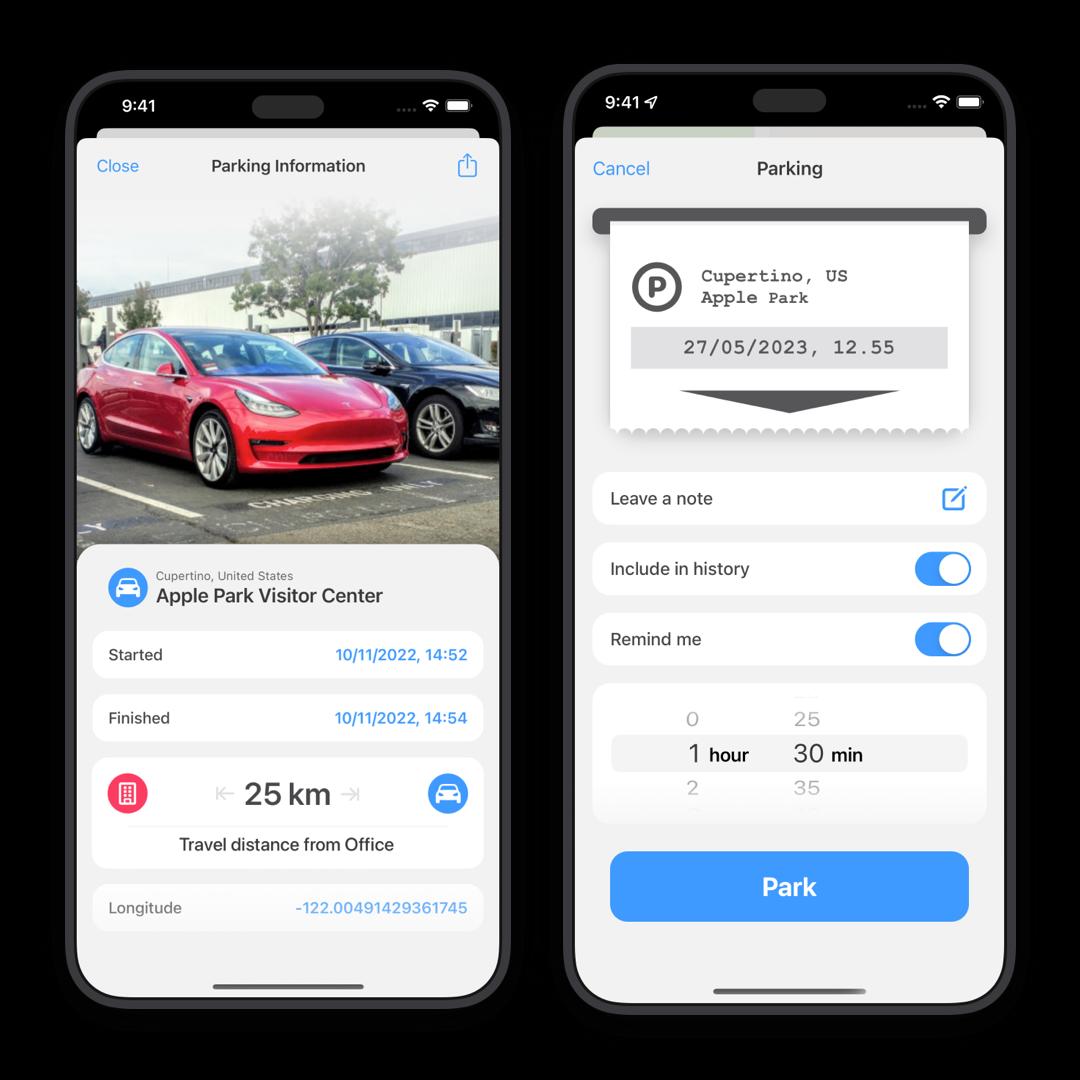
- When you leave the car, tap Park to save the spot.
- Set a reminder for a time before your parking runs out. Add a note too, such as the bay number or the time on your ticket.
- Keep an eye on the parking timer: it shows as a Live Activity on the Lock Screen and in the Dynamic Island. Each parking has a Show on Lock Screen switch.
- When the reminder comes, open the app and follow the walking directions back to the car.
Wearing an Apple Watch? The Find My Car app on the watch helps on the walk back: it points towards the car and shows the distance.
More about Find My Car for iPhone →
How to set a parking reminder on Android
- Install Find My Car from Google Play and allow it to use your location. It needs Android 12 or later.
- When you leave the car, tap Park to save the spot.
- Set a reminder for a time before your parking runs out. Add a note too, such as the bay number or the time on your ticket.
- Add the Find My Car widget to your home screen. It shows the street, how long you have been parked and the countdown to your reminder, and it has a Navigate button.
- When the reminder comes, follow the route on the map in the app, or tap Navigate to open Google Maps or the maps app you prefer.
Forgot to set a reminder? When no reminder is set, the Android app sends a "Still parked?" notification after your usual parking time, with Navigate and "I've got it" buttons. You can turn this check-in off.
More about Find My Car for Android →
A free parking reminder on iPhone and Android
Saving the spot, notes, the reminder and the walking route back are free on both iPhone and Android, and so is the history of your last 30 days of parking. Pro adds a photo of the car and of the parking ticket, your full history and no ads. Prices are shown in the app.
Tips for a parking meter reminder that saves you the fine
- Set it early. Take the time your parking expires and subtract the walk back to the car and a few minutes of margin.
- Read the sign before you walk away. A maximum stay, or rules that change at a certain hour, apply even when you have paid.
- Add a note with the floor, row or bay, so you can go straight to the car when the reminder comes.
- Keep proof of payment. With Pro you can add a photo of the parking ticket to the parking; otherwise a quick photo with your phone camera does the job.
- Paying in a parking app or by text message? The end time is in the confirmation, so set your reminder from that.
Parking in a multi-storey or at the airport? Read how to find your car in a car park →
Questions about parking reminders
Is there a free parking reminder app?
Yes. Find My Car is free on iPhone and Android, and the reminder before your parking time runs out is part of the free app, together with saving the spot, notes and the walking route back.
Does the parking reminder work on both iPhone and Android?
Yes. Both apps remind you before your parking time runs out. On iPhone the parking timer also shows as a Live Activity on the Lock Screen and in the Dynamic Island. On Android the home screen widget shows the countdown to your reminder.
What happens if I forget to set a reminder?
On Android, Find My Car sends a "Still parked?" notification after your usual parking time when no reminder is set, and you can turn it off. On iPhone, make the reminder part of saving the spot: set it before you walk away.
Can I save a photo of my parking ticket?
Yes, with Pro you can add a photo of the car and of the parking ticket on both iPhone and Android. On Android you can also unlock one free photo by watching an ad.
How early should I set a parking reminder?
Early enough to walk back. Take the time your parking expires, subtract the walk to the car and a few minutes of margin, and set the reminder for then.